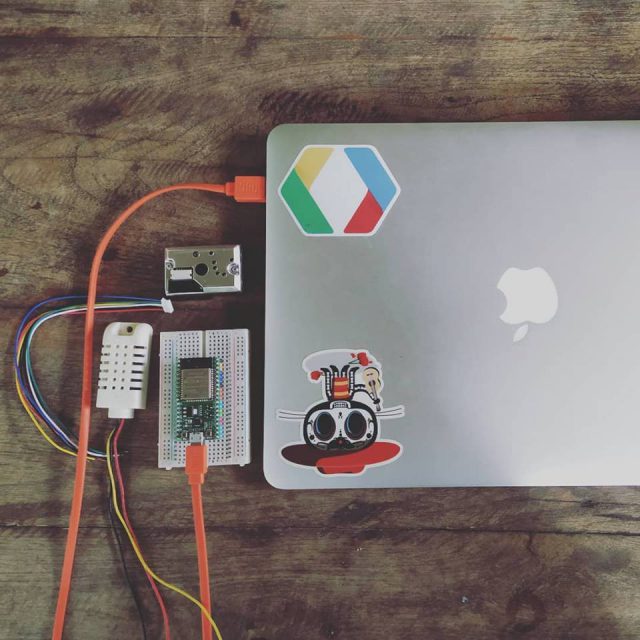
เนื่องในวัน ESP32 Day (03/02/2019) ผมเองไม่ได้ไปร่วมงานที่จัดกัน เพราะติดงานอื่น และได้ sensors วัด PM2.5 มาพอดี ก็เลยมาทำ Sensers Node เพื่อวัดค่า PM2.5 ในบริเวณที่อยู่อาศัย แล้วส่งขึ้น thingspeak.com และ netpie.io freeboard เพื่อทำ Dashboard สวยๆ งามๆ และเป็นประโยชน์ในการรายงานค่า PM2.5 ที่มีปัญหากันอยู่ในประเทศไทย ตอนนี้ ให้เพื่อนๆ พี่ๆ น้องๆ ได้รับทราบกันครับ …
1. อุปกรณ์ และ stack ที่ใช้มีดังนี้
– ESP32 (NODE32 LITE) 275 บาท [https://gravitechthai.com/product_detail.php?d=3318]
– SHARP GP2Y1010AU0F (PM2.5 Sensor) 137 บาท [https://shopee.co.th/product/59553004/1361931900]
– AM2302 (Temperature+Humidity Sensor) 180 บาท [https://www.myarduino.net/product/725/]
– thingspeak.com
– netpie.io
รวมราคา อุปกรณ์ ที่ใช้ ประมาณ 600 บาท ครับ 🙂
2. รายละเอียด ของ SHARP GP2Y1010AU0F Sensor
สำหรับรายละเอียด ของแต่ละ PIN ของ SHARP GP2Y1010AU0F เป็นดังนี้ครับ
โดยจะต้องมี C 220 uF และ R 150 ohm ต่อด้วย (ตัวที่ผมซื้อมา พี่จีน ลืมแถมมาให้ +__+)
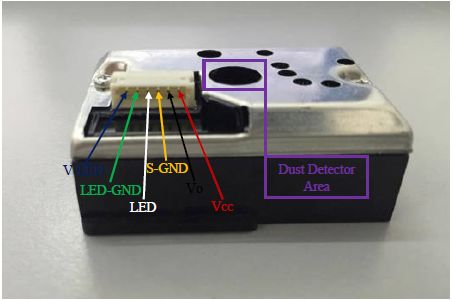
Sensor ที่ผมได้มา จะแถมสาย เรียงสีมาแบบนี้เลยครับ แต่มีบาง version จะเป็นสีเรียงต่างจากนี้ ไม่ต้องตกใจครับ ..
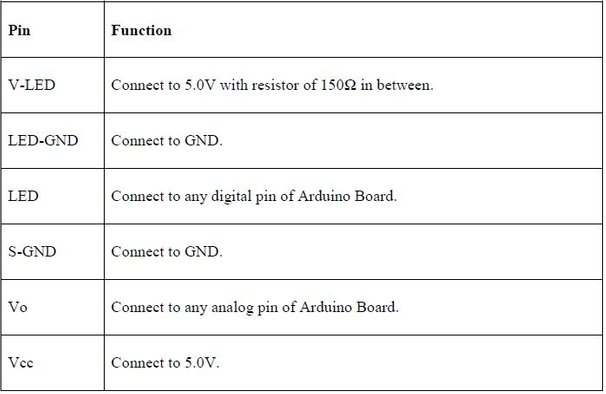
PIN ต่างๆ มีดังนี้ INPUT จะมี LED PIN (Digital PIN) กับ Vo PIN (Analog PIN)
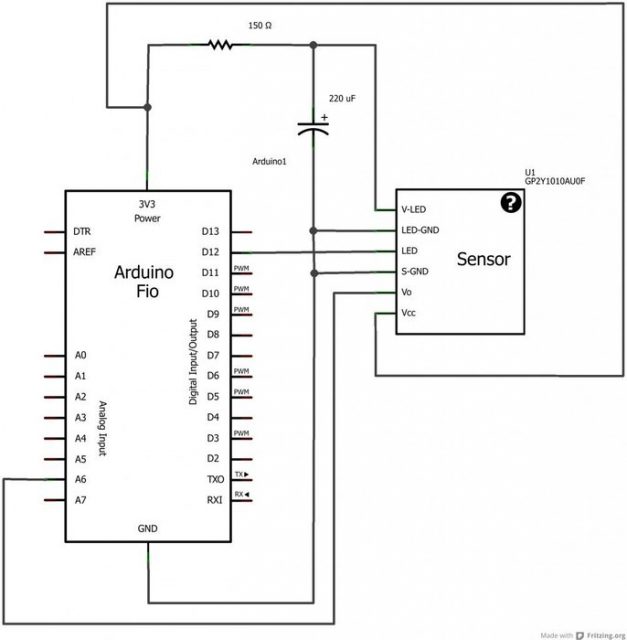
รายละเอียดการต่อขาต่างๆ ในที่นี้เทียบกับ Arduino ถ้าเป็น ESP32 ก็คล้ายๆ กันครับ
3. PIN ต่างๆ ที่ใช้งานกับ ESP32 (NODE32 LITE)
สำหรับในการต่อใช้งาน กับ ESP32 (NODE32 LITE) ผมจะใช้ PIN ต่างๆ ประมาณนี้
– PIN 13 กับขา INPUT ของ AM2302 (Temperature+Humidity Sensor)
– PIN 16 กับขา LED ของ SHARP GP2Y1010AU0F (PM2.5 Sensor)
– PIN 36 (Analog INPUT) กับขา Vo ของ SHARP GP2Y1010AU0F (PM2.5 Sensor)
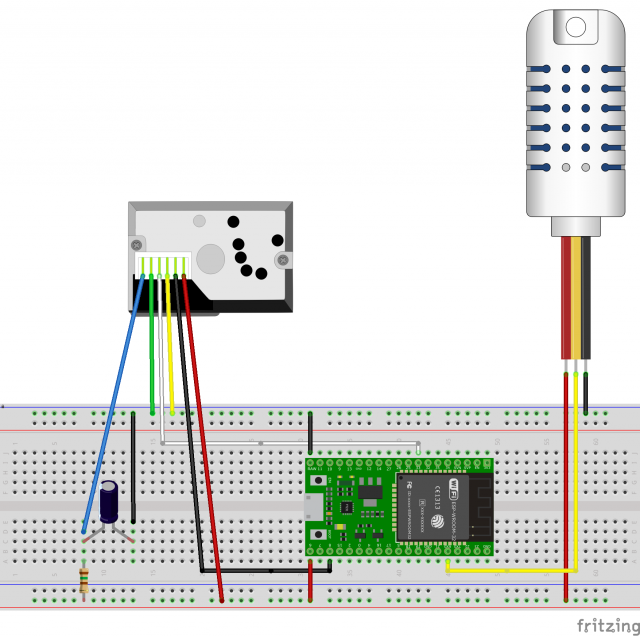
การเชื่อมต่อ Node32 Lite + Sharp GP2Y1010AU0F และ AM2302
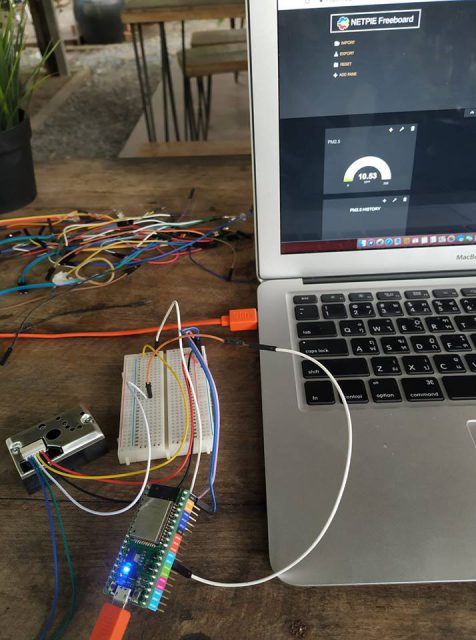
ในรูป ยังไม่ได้ต่อ AM2302 (Temperature+Humidity Sensor) แต่คิดว่าเพื่อนๆ น่าจะเคยใช้งานกันมาแล้ว
ใน Arduino IDE เราจะต้องทำการเพิ่ม PMSensor Library เข้าไปด้วยนะครับ
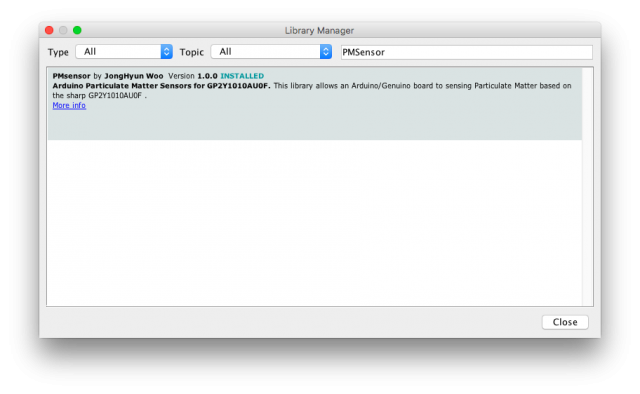
4. Source Code
สำหรับ Code ผมเขียนเป็น Deep Sleep Mode ทุกๆ 1 นาที ประมาณนี้ครับ ..
ถามว่าทำไมต้อง Deep Sleep Mode?
คำตอบคือ เพื่อประหยัด battery เวลาใช้งานจริงครับ และอุปกรณ์พวกนี้ ถ้าให้ connect WiFi ตลอดเวลา จะเกิดความร้อนสูงมาก ทำให้ ประสิทธิภาพในการทำงาน ลดลง หรือทำงานผิดพลาดได้ง่าย ครับ ..
/* Connect to SHARP PM2.5 Sensor*/
#include <PMsensor.h>
PMsensor PM;
#include <WiFi.h>
#include "DHT.h"
#define DHTPIN 13   // NodeMCU PIN D1
#define DHTTYPE DHT22   // DHT 22  (AM2302), AM2321
//#define DHTTYPE DHT21   // DHT 21 (AM2301)
DHT dht(DHTPIN, DHTTYPE);

// AP
const char* ssid     = "SookYenFarm";    // SSID Wifi
const char* password = "********";   // Password Wifi

// HTTP API
const char* host = "api.thingspeak.com";
const char* api   = "********";  //API Key

int value = 0;
void connect() {
  // We start by connecting to a WiFi network
  Serial.println();
  Serial.println();
  Serial.print("Connecting to ");
  Serial.println(ssid);
  WiFi.begin(ssid, password);
  while (WiFi.status() != WL_CONNECTED) {
    delay(500);
    Serial.print(".");
  }
  Serial.println("");
  Serial.println("WiFi connected");
  Serial.println("IP address: ");
  Serial.println(WiFi.localIP());
  Serial.println("DHT22 test!");

  dht.begin();

  // LED Stop
  //digitalWrite(LED_BUILTIN, HIGH);
  //delay(10);
  //delay(60000);
  ++value;
  float h = dht.readHumidity();
  float t = dht.readTemperature();
  float f = dht.readTemperature(true);
  if (isnan(h) || isnan(t) || isnan(f)) {
    Serial.println("Failed to read from DHT sensor!");
    return;
  }
  float hif = dht.computeHeatIndex(f, h);
  float hic = dht.computeHeatIndex(t, h, false);
  Serial.print("Humidity: ");
  Serial.print(h);
  Serial.print(" %\t");
  Serial.print("Temperature: ");
  Serial.print(t);
  Serial.print(" *C ");
  Serial.print(f);
  Serial.print(" *F\t");
  Serial.print("Heat index: ");
  Serial.print(hic);
  Serial.print(" *C ");
  Serial.print(hif);
  Serial.println(" *F");
  Serial.print("connecting to ");
  Serial.println(host);

  float pm = 0;
  int err = PMsensorErrSuccess;

  if ((err = PM.read(&pm, true, 0.1)) != PMsensorErrSuccess) {
    Serial.print("data Error = ");
    Serial.println(err);
    return;
  }
  Serial.print("PM2.5: ");
  Serial.print(pm);
  Serial.println(" ppm");

  // Use WiFiClient class to create TCP connections
  WiFiClient client;
  const int httpPort = 80;
  if (!client.connect(host, httpPort)) {
    Serial.println("connection failed");
    return;
  }

  // We now create a URI for the request
  String url = "/update?api_key=";
  url += api;
  url += "&field1=";
  url += t;
  url += "&field2=";
  url += h;
  url += "&field3=";
  url += pm;
  // https://api.thingspeak.com/update?api_key=xxxxxxxxxx&field1=t&field2=h&field3=pm
  Serial.print("Requesting URL: ");
  Serial.println(url);
  // This will send the request to the server
  client.print(String("GET ") + url + " HTTP/1.1\r\n" +
               "Host: " + host + "\r\n" +
               "Connection: close\r\n\r\n");
   //Wait up to 10 seconds for server to respond then read response
   int i=0;
   while((!client.available()) && (i<1000)){
     // LED Blink
     digitalWrite(LED_BUILTIN, LOW);
     delay(10);
     //Serial.println(i);
     i++;
   }
   while(client.available()){
     String line = client.readStringUntil('\r');
     Serial.print(line);
   }
   Serial.println();
   Serial.println("closing connection");
}
void setup() {
  Serial.begin(115200);
  Serial.setTimeout(2000);
  delay(1000);
  pinMode(LED_BUILTIN, OUTPUT);
  /////(infrared LED pin, sensor pin)  /////
  PM.init(16, 36);

  // Wait for serial to initialize.
  while (!Serial) { }

  Serial.println("Device Started");
  Serial.println("-------------------------------------");
  Serial.println("Running Deep Sleep Firmware!");
  Serial.println("-------------------------------------");

  connect();

  Serial.println("Sleeping 60 seconds ..");
  // Deep Sleep 60 seconds
  ESP.deepSleep(58e6); // 60e6 is 60 microsecondsESP.
  //ESP.deepSleep(298e6); // 5*60 microsecondsESP.
}
Source Code ใน GitHub ตามนี้เลยครับ ESP32 PM2.5 sensor
5. Data ที่ Feed ขึ้น ThingSpeak
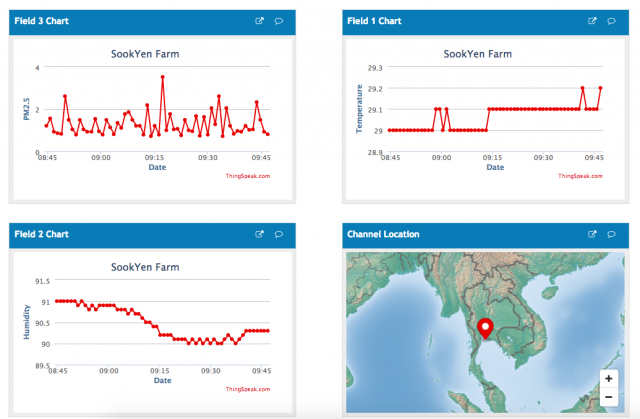
https://thingspeak.com/channels/91414
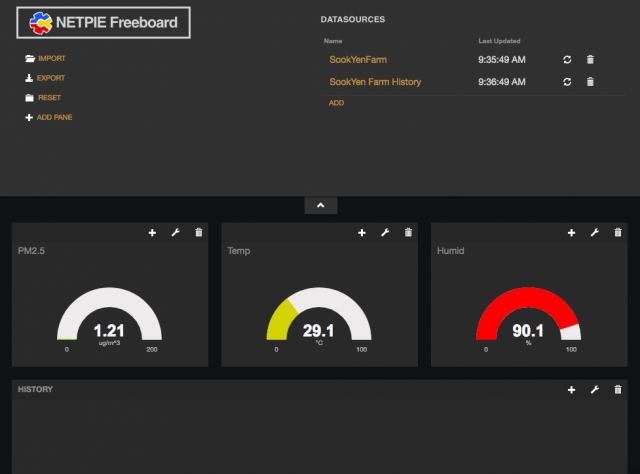
6. Dashboard ที่ feed จาก ThingSpeak ขึ้น netpie.io Freeboard
Next Step …
– ทำ Shield สำเร็จรูป SHARP GP2Y1010AU0F + AM2302 สำหรับ ESP32 (NODE32 LITE)
– ทำ Box กันน้ำ เพื่อให้สามารถนำไปติดตั้งตามจุดต่างๆ ได้สะดวกขึ้น
– ใช้แผง Solar Cells มาใช้งานกับ Battery 18650
– รายงาน รายละเอียด ผ่าน LINE Bot
– สั่งปั้มพ่นหมอกทำงาน เมื่อค่า PM2.5 เกินกำหนด 🙂
Reference Links
https://blog.netpie.io/archives/3028
https://www.instructables.com/id/How-to-Interface-With-Optical-Dust-Sensor/
ปล. สำหรับใครที่สนใจอยากทำบ้าง หรือสงสัยตรงไหน สามารถ post ถามได้ที่ blog นี้ได้เลยครับ 🙂
pinup Toshkent [url=http://pinup23465.shop]http://pinup23465.shop[/url]
So I’ve been messing around on Craybet for about six weeks or so and figured I’d share some thoughts since I haven’t seen much discussion about them on here. I signed up randomly one night and the whole process took maybe two minutes. Starting deposit was $10 and that’s normal for US-facing sites. They threw in a welcome bonus — 100 percent match to $500 and 50 free spins on Gates of Olympus. Rollover is 35x and that isn’t amazing but I’ve dealt with worse.
Their slots catalog is bigger than I expected. You’ll find stuff from Pragmatic Play, Betsoft, plus Play’n GO — so like Book of Dead, Gonzo’s Quest, that kind of thing. Somewhere around 1500-2000 slots when you add it all up. Live casino uses Evolution and it’s smooth — tried baccarat and Crazy Time with real dealers and zero lag issues.
Now the one thing that annoyed me a little was payout speed. Withdrew via Bitcoin and waited almost two days the first time. Once you’re verified though it dropped to like 24 hours. They accept credit cards, Skrill, Neteller, and crypto which is pretty much everything you’d want. I’d look at their current offers on [url=https://svnewtech.com]Craybet if you’re interested.
Mobile experience on Craybet on mobile was surprisingly good. No dedicated app but the web app loads fast and slots and live games work without issues. I played a few sessions in bed and had zero lag or glitches.
Customer service on Craybet has been decent — they have live chat that actually connects pretty quick most times. Reached out once about a pending withdrawal and they sorted it pretty quickly. Not sure about Curacao-based from what I can tell which is standard for platforms like this. Wouldn’t say it’s perfect — the bonus wagering could be lower — but for what it is it does the job for me.